
How to Choose the Right Minecraft Server Hosting Provider
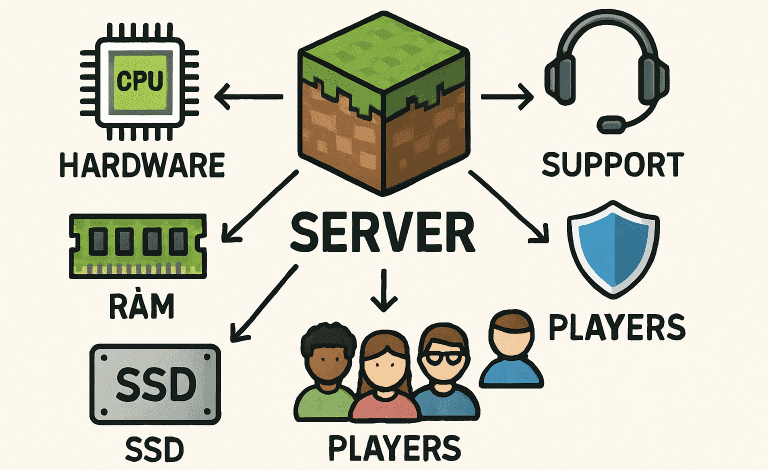
Launching your Minecraft server is a rewarding way to create a custom world for you and your community. From controlling mods and gameplay to inviting friends or starting public spaces, your choice of server host significantly impacts performance and reliability. Before you begin building, the first step is to rent Minecraft server space from a top provider to ensure seamless experiences and ongoing stability.
Whether you’re just starting or planning to migrate your server to a new provider, making the right decision can be overwhelming given the numerous options available. This guide unpacks all the vital considerations—from hardware requirements to support quality—so you can confidently rent Minecraft server resources that match your expectations and gameplay ambitions.
Server Performance
Exceptional performance sits at the core of any enjoyable Minecraft server experience. Lag or frequent downtime can quickly drain the fun from your world. Carefully consider the following aspects:
- CPU and RAM: Minecraft servers thrive on robust hardware. Modern, high-clock CPUs and enough RAM (at least 4-8GB for most multiplayer servers) are essential for supporting plugins, mods, and simultaneous players.
- SSD Storage: SSDs drastically reduce world loading times compared to older HDDs, contributing to a smooth experience for all players.
- Bandwidth: Ample bandwidth ensures that even during busy hours, your server remains responsive and accessible.
Server Location
Physical server proximity impacts latency and lag. Choosing a data center close to your main player base results in shorter ping times and uninterrupted gameplay. Most leading hosts offer data centers in strategic global regions, allowing for localized experiences, whether your community is in North America, Europe, or Asia. For best results, confirm the host offers a node near your players and always test network speeds when possible.
Customer Support
Technical issues or outages can emerge at any time. Responsive, knowledgeable customer support is non-negotiable, especially when managing a busy public server. Opt for providers that offer 24/7 support via live chat, email, or phone. Check for transparent response time guarantees and read customer service reviews on independent tech sites. A host with a rich knowledge base or comprehensive FAQ can save trouble for both beginners and advanced administrators.
Security Features
Security lapses could cost you hours of gameplay or wreak havoc on your carefully crafted world. Crucial security services include:
- DDoS Protection: Defense against malicious attacks that could bring your server offline.
- Automated Backups: Regular, scheduled backups safeguard your world, allowing for quick recovery in case of corruption or accidental deletion.
- Firewall Management: Custom firewalls and IP blocking guard against unauthorized access.
Assess whether your hosting provider effectively manages these features and check for proactive security policies outlined in TechRadar’s GG Servers review.
Scalability
If you expect your Minecraft community to grow or plan to add new mods over time, your server should be flexible. Scalable hosting allows for quick upgrades—be it RAM, CPU, or player slots—without data loss or downtime. Confirm that your provider offers straightforward upgrade paths and isn’t restrictive about scaling down if your needs change. Look for flexible billing as well, so you only pay for what you use.
Pricing and Value
Cost is crucial, but balance it with the features offered. Some low-cost providers may cut corners on hardware or support, impacting server stability. Compare plans based not just on price but also on RAM, security, support options, and mod/plugin compatibility. Avoid commitments to annual plans unless you are satisfied after a free trial or short-term test, as recommended by web hosting comparison articles in TechRadar’s BisectHosting review.
Mod and Plugin Support
Advanced server administrators often rely on plugins and mods to create unique gameplay. The best server hosts make it easy to customize with:
- One-click installers for popular modpacks
- Root or FTP access for fine control
- Automated update features, so you’re never behind on the latest versions
Check compatibility lists or community forums to verify support for your favorite mod loaders, plugin libraries, and custom worlds.
Control Panel and User Interface
An easy-to-use server control panel reduces setup time and prevents mistakes. The top Minecraft server hosts provide intuitive dashboards for starting, stopping, or restarting servers, installing mods, editing files, and monitoring resource usage. Features like scheduled tasks, analytics, and user roles boost efficiency, making it accessible even for non-technical managers.
Making an informed decision about your Minecraft server host ensures you, your friends, and your broader community will enjoy stable, secure, and customizable gameplay for the long haul. Weigh these factors, conduct thorough research, and use trusted resources to compare features and reviews, so you can enjoy building your perfect world without interruptions.