
Creative Patterns in Modern Website Navigation Menus
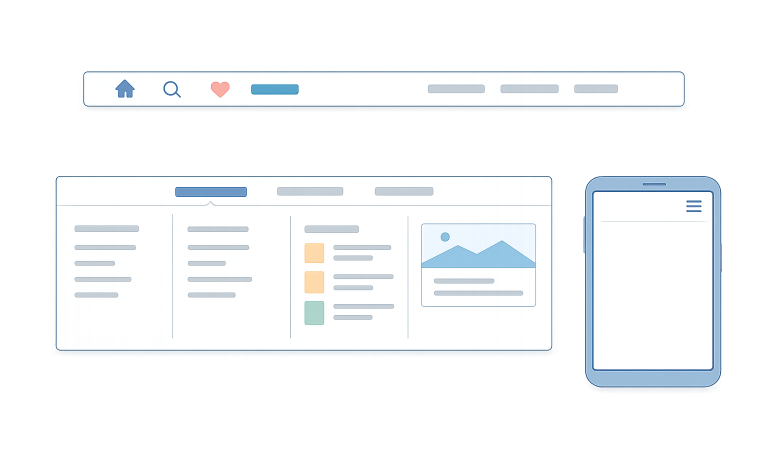
Navigation menus are the backbone of user experience on any website. A well-designed menu guides visitors seamlessly while improving engagement and boosting conversion rates. As web design continues to evolve, several innovative patterns are emerging and reshaping how users interact with websites. For those looking for inspiration, exploring navigation menu design examples is a great way to see these trends in action.
Modern navigation is about much more than just linking pages. Menus must be intuitive, visually appealing, and adaptable across devices and users. Implementing current trends helps ensure your site remains accessible and efficient, delivering a positive overall user experience.
Recent trends point to a shift toward simplicity and accessibility, benefiting both users and site owners. Minimalism, mega menus, and personalized navigation are all being embraced by industry leaders to meet the evolving needs of diverse audiences. For websites serving large amounts of content, finding the right balance between clean design and comprehensive access points is essential.
With most web traffic now coming from mobile devices, site navigation is under more scrutiny than ever before. Responsive layouts, touch-friendly icons, and thoughtful structure determine whether visitors stay or leave. Choosing the right pattern for your audience impacts every other element of site performance, from bounce rates to conversions.
Minimalist designs
Minimalism in navigation has gained enormous popularity as websites strive for clarity and focus. By streamlining navigation menus, brands reduce users’ cognitive overload. Minimalist menus often feature just a handful of carefully chosen links, clear typography, and subtle icons.
This cleaner approach has proven effective; studies show that reducing menu items from eight to five can boost task completion rates by nearly 30 percent. Fewer choices make it easier for visitors to find what matters most, improving satisfaction and driving strategic conversions.
Mega menus
When websites offer a vast array of products or information, mega menus help organize complex hierarchies. These large dropdown menus display multiple categories and subcategories simultaneously, enabling users to browse a broad selection without excessive clicks.
Mega menus are staples for major e-commerce platforms, enterprise websites, and news portals. Amazon and Walmart are prime examples, utilizing mega menus to streamline journeys through extensive inventories. While mega menus are versatile, clarity and structure should always be prioritized to avoid overwhelming users.
Personalized navigation
Personalization is reshaping the way users interact with navigation menus. Dynamic navigation elements that adjust based on user profiles or browsing history offer shortcuts to relevant resources and increase engagement. For instance, news networks often display personalized navigation panels showcasing topics tied to recent user activity.
Personalization reduces friction, making it easier for visitors to resume tasks and discover content tailored to their needs. The success of personalized navigation hinges on the responsible use of data and transparency in customization processes. For more on web personalization and trends, visit Nielsen Norman Group.
Mobile-friendly patterns
With mobile traffic at an all-time high, designing mobile-friendly navigation is essential. Patterns such as sticky headers, hybrid menus, and hamburger menus enable users to quickly access both primary and secondary content.
A popular approach pairs a minimalist top navigation bar with a hamburger icon that reveals extended options, maximizing both visibility and available screen space. This improves usability by catering to the limitations of smaller screens and supporting thumb-friendly interaction.
Responsive navigation patterns can make the difference between a smooth experience and user frustration, particularly when switching seamlessly between devices.
Accessibility considerations
Navigation should be inclusive, providing full functionality to users of all abilities. To achieve strong accessibility, designers implement keyboard navigation, high-contrast focus states, and ARIA labels for screen readers.
Menus that are easy to navigate with assistive technologies help ensure everyone can interact with a website. The Web Content Accessibility Guidelines (WCAG) set out the essentials for building accessible web navigation. Integrating these features not only supports inclusivity but also broadens your audience. Readers can find authoritative guidance on this matter by consulting the World Wide Web Consortium.
Animation and feedback
Subtle animation can enhance the usability of navigation menus by providing visual feedback and guiding the user’s next actions. Animations like smooth fade effects, hover movement, or gentle transitions between open and closed menu states make it easier to access both primary and secondary content quickly and also alert the user to completed actions or highlight areas requiring attention.
However, animations should be carefully balanced to avoid hindering accessibility or slowing down the interface. When used responsibly, animation fosters a dynamic, engaging feel that matches modern expectations.
Best practices
- Keep navigation as simple and intuitive as possible.
- Prioritize responsive menus and use clear hierarchies for easy access.
- Focus on accessibility, ensuring menus work with all devices and technologies.
- Analyze usage metrics and feedback to identify opportunities for improvement.
By understanding and deploying the latest creative patterns, designers and site owners can craft navigation systems that elevate user experiences across all platforms. Adopting proven trends like minimalism, personalization, and accessibility not only attracts more visitors but also encourages longer engagement and higher conversions, setting your site up for long-term success.