Critical Cybersecurity Threats Businesses Face and How IT Support Stops Them
Online security is no longer a topic limited to large companies or technical experts. Almost every business now relies on email, shared files, online payments, and cloud tools to handle daily work. These tools save time and improve teamwork, but they also create risks that many people do not notice until something goes wrong.
A common question many business owners ask is simple and practical. How do these cyber threats begin, and how can they be stopped without turning work into a stressful or confusing process? The good news is that most risks can be reduced with clear habits, basic awareness, and the right kind of ongoing IT services support.
Why Digital Safety Deserves Daily Attention
Every business holds information that matters, even if it does not seem sensitive at first. Customer contact details, employee records, financial data, and internal documents all have value. When this information is lost, changed, or exposed, the damage can affect trust, productivity, and peace of mind.
Good protection does not rely on fear or strict rules. It focuses on consistency, communication, and support. With help from IT support, companies can create simple systems that guard information while keeping daily tasks smooth and familiar for everyone.
Phishing Messages That Trick Employees
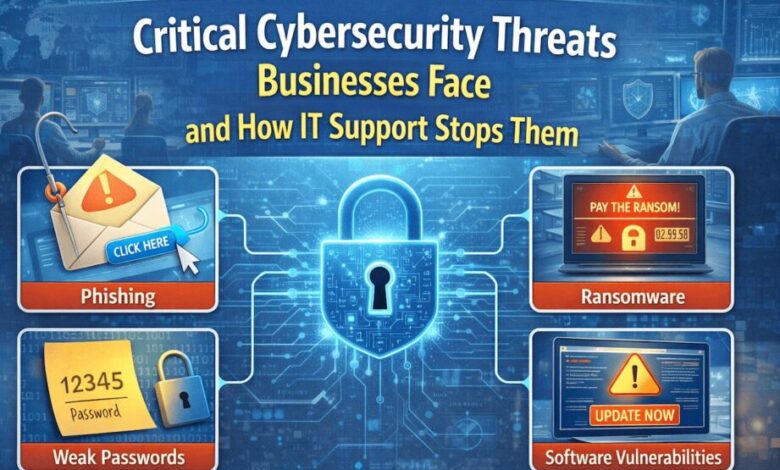
Phishing is one of the most common cyber threats because it targets people rather than machines. These messages often look like regular emails, texts, or alerts from trusted sources. They may ask for quick action, claim an issue with an account, or include a link that seems harmless.
Once someone clicks a link or shares login details, attackers can gain access to systems. Support teams help prevent this by setting up filters and sharing easy tips on how to spot warning signs. When staff learn to slow down and check messages carefully, the risk drops sharply.
Weak Passwords That Allow Easy Access
Passwords act as the first line of defense for most systems. When they are short, simple, or reused across tools, attackers can guess them quickly. Automated programs can test thousands of combinations in seconds.
Simple habits that improve password safety
- Use longer passphrases made from familiar words.
- Avoid using names, dates, or common patterns.
- Never share login details with coworkers.
- Change passwords on a regular schedule.
Support teams help create clear rules and reminders around access control. This guidance removes confusion and makes safe habits easier to follow without frustration.
Ransom Attacks That Block Critical Files
Ransom attacks lock important files and demand payment to restore access. For many businesses, this can bring work to a complete stop. Deadlines are missed, customers wait longer, and stress levels rise quickly.
The best defense focuses on preparation. Regular backups stored securely allow data to be restored without paying a ransom. Clear response steps also help staff know what to do right away, which limits damage and speeds up recovery.
Software Updates That Close Hidden Gaps
Every piece of software has flaws that are discovered over time. Updates are released to fix these weak spots. When updates are ignored or delayed, attackers can use known issues to break into systems.
Support teams manage updates carefully so they do not disrupt work. They test patches, schedule installs, and confirm systems still run smoothly. This behind-the-scenes work removes risks while allowing staff to stay focused on their responsibilities.
Internal Errors That Cause Data Exposure
Not all security problems come from outside attackers. Simple mistakes can also lead to trouble. Sending files to the wrong person, using personal devices for work, or saving data in unsafe locations can expose information.
Clear policies and friendly training reduce these risks. When staff understand why certain steps matter, they are more likely to follow them. A supportive approach also encourages people to report mistakes early, which helps limit damage.
How Professional Support Keeps Systems Steady
Reliable support brings all safety efforts together under one clear plan. Teams that use IT services gain regular monitoring, guidance, and quick help when something feels wrong. This support acts as a safety net that catches small issues before they grow.
Instead of reacting after damage occurs, expert care focuses on prevention. Systems stay updated, backups remain current, and staff feel comfortable asking questions. This steady presence builds confidence and reduces downtime.
Teaches Safe Habits Without Pressure
Security works best when people feel informed rather than afraid. Short training sessions, clear reminders, and open communication help build awareness. Staff learn how to handle data safely and know who to contact when unsure.
This approach turns protection into a shared responsibility. Over time, safe actions become part of a daily routine. Support teams reinforce this mindset by staying approachable and clear in their guidance.
Cyber risks will continue to change as tools and work styles evolve. What remains constant is the need for simple habits, clear plans, and trusted support. Businesses that invest in awareness and steady care handle challenges with less disruption. With the right guidance, security becomes manageable rather than overwhelming. Teams stay focused on growth and service while knowing their systems are protected. That confidence supports smoother operations, stronger trust, and a calmer work environment every day.